Construction Accounting Software: A 2026 Guide for Contractors
Construction accounting software is financial management software built specifically for contractors—designed to track job costs, manage progress billing, handle compliance documents, and report profitability at the project level rather than just the company level.
Unlike traditional accounting systems that focus primarily on company-level financial reporting, construction accounting platforms organize financial activity around projects, cost codes, and contracts.
Many contractors run their financials in systems such as QuickBooks, Sage, Foundation, or CMiC, then use construction-specific tools to manage job costing, billing workflows, and compliance requirements. This guide explains what construction accounting software does, the features that matter most, and how to choose the right platform for your business.
What is construction accounting software
Construction accounting software is a financial management system designed for project-based businesses such as general contractors, specialty trades, and home builders.
While general accounting platforms track income, expenses, and financial statements at the company level, construction accounting systems track costs, billing, and profitability at the project level.
These systems support industry-specific workflows such as:
• Job costing • AIA-style progress billing • Change order tracking • Retainage management • Compliance documentation
Construction companies may use dedicated construction ERP systems like Sage Intacct Construction, Foundation Software, or CMiC, or they may connect construction financial tools to their existing accounting system.
The key difference is financial visibility.
Traditional accounting systems show how the business is performing overall. Construction accounting software shows how each individual project is performing in real time, helping contractors catch issues before they impact margins.
Why construction companies need specialized accounting workflows
Many accounting platforms provide strong financial foundations, including general ledger management, accounts payable, and financial reporting. However, construction introduces operational complexity that standard accounting tools were not originally designed to manage on their own.
Project-based job costing, progress billing, retainage tracking, and vendor compliance documentation require workflows that go beyond traditional accounting structures.
As construction companies grow, many adopt specialized construction accounting tools or ERP systems to manage these workflows more efficiently.
Project-based job costing requires deeper financial tracking
Most accounting systems organize expenses by account categories such as materials, payroll, and overhead.
Construction companies also need to track costs by:
• Project • Phase • Trade • Cost code
This allows teams to understand profitability at the job level, not just the company level.
Without job-level visibility, contractors may only discover margin issues after a project has closed, when the opportunity to correct course has already passed.
Construction accounting systems organize transactions by job and cost code, helping teams monitor project financial performance throughout the lifecycle of the project.
Progress billing requires construction-specific processes
70% of contractors regularly face payment delays partly because construction billing rarely follows standard invoice workflows.
Instead, contractors often bill based on:
• Schedule of values • Percent complete • Stored materials • Change orders • Retainage
Many construction projects also require documentation such as AIA G702 and G703 billing forms.
Without construction-specific tools, finance teams often manage these processes manually using spreadsheets and email coordination between project managers, accounting teams, and owners.
Construction accounting software automates this process by linking project costs, budgets, and billing together in a single system.
Compliance documentation adds operational complexity
Construction projects also involve extensive vendor documentation requirements.
These may include:
• Conditional and unconditional lien waivers • Insurance certificates • W-9 forms • Vendor compliance records
Tracking these documents manually can slow payments and increase risk if required paperwork is missing.
Many construction accounting platforms include automated compliance tracking that organizes vendor documentation and alerts teams when updates are required before payments are released.
Real-time financial visibility improves decision making
Construction financials can quickly become outdated when job costs, invoices, and field updates are processed manually or across disconnected systems. In fact, only 31% of projects come within 10% of budget.
Modern construction accounting platforms connect financial data with project activity, allowing teams to maintain an up-to-date view of:
• Budgets • Forecasts • Cost to complete • Job profitability
This real-time visibility helps contractors identify issues earlier and make adjustments before small problems become expensive overruns.
Integration with accounting and project management systems
Construction accounting software rarely operates in isolation.
Most construction companies connect financial tools with other systems used across the business, including:
• Accounting platforms such as QuickBooks, Sage, or Foundation • Project management systems such as Procore or Buildertrend • Estimating platforms • Payroll systems
When evaluating construction accounting software, it’s important to look for deep integrations and reliable data synchronization between systems.
Strong integrations ensure that financial data, job information, and project updates remain aligned across the entire organization.
What features to look for in construction accounting software
Not all construction accounting platforms are created equal. Here’s what separates the useful ones from the ones that create more work than they save.
Job costing and cost code management
Every transaction—every bill, every receipt, every payroll entry—gets assigned to a job, phase, and cost code. The software compares actual costs against budgeted amounts through real-time job costing. And the cost code structure matches your estimating system, so you’re comparing apples to apples.
Accounts payable automation and bill processing
AI-powered bill reading extracts vendor name, amount, and line items automatically. Bills route for approval based on rules you set—by job, by amount, by vendor. No more sorting through a stack of invoices manually.
Budget tracking and WIP reporting
WIP (Work in Progress) reports show how much you’ve earned versus how much you’ve billed on each job. This is how you spot overbilling or underbilling before it becomes a problem. It’s also essential for accurate revenue recognition if you’re on percentage-of-completion accounting.
Progress billing and draw management
Look for support for both fixed-fee and cost-plus billing. One-click draw package creation pulls in current costs and backup documentation automatically—no more assembling packages by hand.
Lien waiver and insurance compliance
Automated tracking of conditional and unconditional lien waivers keeps you protected. The platform alerts you when vendor insurance is expiring and can block payments until updated documents arrive.
Receipt capture and expense tracking
Mobile receipt capture codes purchases to the correct job automatically. Connected company cards reconcile expenses without chasing project managers for paperwork.
Financial reporting and dashboards
Job profitability reports, cash flow forecasting, and aged receivables are baseline requirements. Real-time dashboards give you a current view of your financials—not just month-end snapshots that are already stale by the time you see them.
Integration with QuickBooks and project management tools
Most contractors use QuickBooks as their general ledger. Any new software you add needs a two-way sync—not just a one-way export. Changes in QuickBooks reflect in your construction software, and vice versa. Also check for connections to Procore, Buildertrend, or whatever PM tools you’re already using.
How to choose construction accounting software for your business size
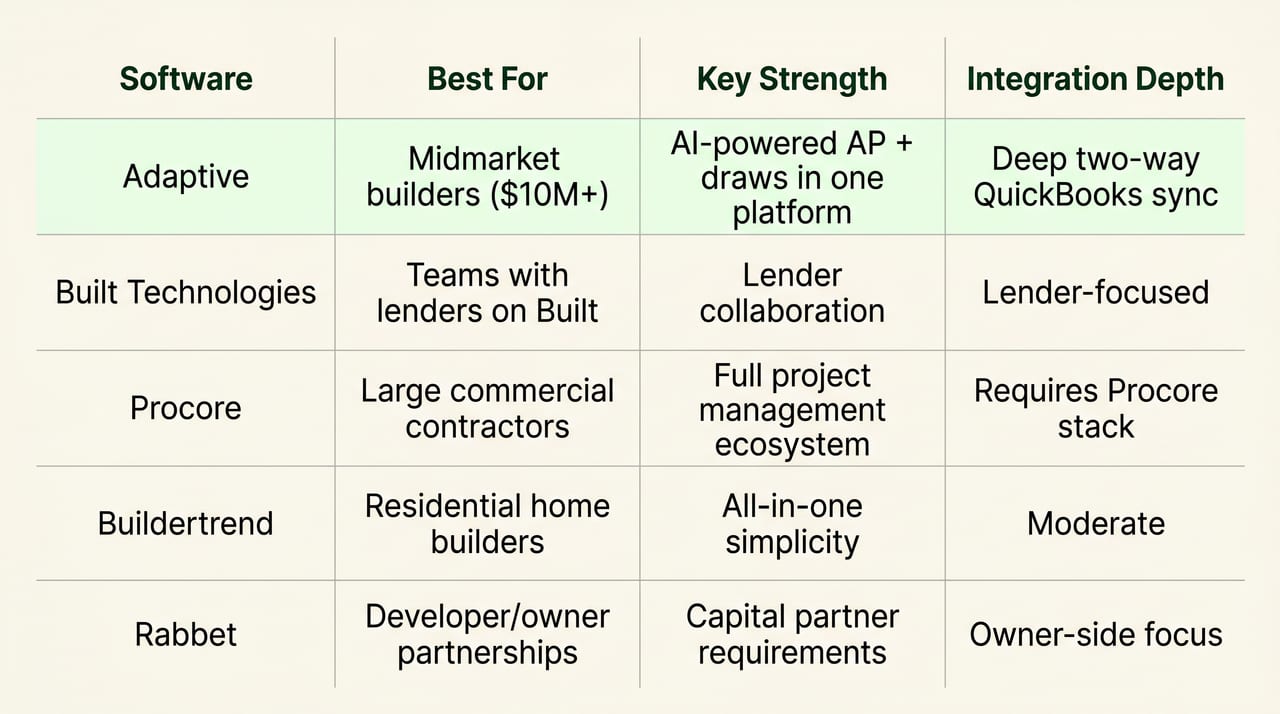
The right platform depends on where you are as a company. What works for a $3M remodeler won’t work for a $50M commercial GC.
Small contractors under $5M in annual revenue
QuickBooks Online with construction-focused add-ons often works fine at this stage. The priority is ease of use and low overhead. Basic job costing and invoice tracking cover most of what you need.
Growing contractors between $5M and $20M
This is where generic tools start breaking down. You’re processing more bills, running more jobs, and the manual work is piling up. Automated accounts payable, real-time budgets, and streamlined draw management become essential—without hiring more accounting staff.
Cloud-based platforms that integrate deeply with QuickBooks fit well here. They add construction-specific workflows without forcing you to rip out your existing GL.
Large contractors and commercial builders over $20M
At this scale, you may need a full ERP system like Sage, Foundation, or CMiC. Or you might layer a specialized platform on top of QuickBooks to handle multi-entity reporting, complex compliance, and high transaction volumes. The decision depends on whether you want to replace QuickBooks entirely or keep it as your GL.
Types of construction accounting software platforms
The market breaks down into three main categories. Understanding the differences helps you narrow your options quickly.
Full-service construction ERP systems
Platforms like Sage Intacct, Foundation Software, and CMiC offer comprehensive solutions. They handle everything from job costing to payroll to multi-state compliance. The tradeoff? Implementations are complex and can take months. These systems typically replace QuickBooks entirely and work best for large contractors with dedicated IT and accounting teams.
QuickBooks add-ons for contractors
Smaller apps bolt onto QuickBooks to add specific functions—job costing, document management, time tracking. The depth is often limited, though. They may require significant manual work, and they don’t always talk to each other. You can end up with a patchwork of tools that creates more problems than it solves.
AI-powered construction financial management platforms
This is a newer category. AI automates bill processing, coding, and compliance. These platforms work with your existing QuickBooks GL rather than replacing it, handling AP, AR, budgets, and draws in one integrated system. The advantage is speed—bills get coded in seconds, not hours—and you don’t have to abandon the tools you already know.
What makes a strong QuickBooks integration for construction
Many contractors aren’t going to abandon QuickBooks. So the quality of the integration determines whether new software actually helps or just creates more work.
Two-way sync vs one-way data export
A one-way export means you’re entering data twice or losing visibility between systems. A true two-way sync keeps both systems aligned. Changes in QuickBooks reflect in your construction software, and changes in your construction software push back to QuickBooks—automatically, in real time.
Evaluating integration depth and reliability
Ask specific questions when evaluating a platform: Does it sync jobs, vendors, cost codes, and classes? How often does it sync? What happens when there’s a data conflict?
Look for platforms built around deep QuickBooks integration from the start. If the integration was bolted on later, you’ll feel it in the bugs and workarounds.
Implementation and support for construction accounting software
Setup time and support quality vary widely. A key advantage of construction-specific vendors is that they understand your workflows. A support agent for generic software won’t know what a draw package or lien waiver is—and you’ll waste time explaining basics instead of solving problems.
When evaluating a vendor, ask about:
- Data migration: Can they import existing jobs, vendors, and cost codes?
- Training: Do they offer construction-specific onboarding, not generic software training?
- Ongoing support: Is the support team staffed by people who understand construction accounting?
- Partner network: Can they connect you with construction-focused accountants or bookkeepers if you need outside help?
How the right construction accounting software protects your margins
The point of all this isn’t just better software—it’s better margins. The right platform prevents cash leakage from missed billables, duplicate payments, and unprocessed change orders. Real-time visibility lets you catch problems before they compound.
Builders who move from manual processes to construction-specific software typically see margin improvement simply by stopping cash from leaking out of the business. McKinsey estimates digital transformation in construction can drive cost reductions of 4–6% and productivity gains of 14–15%.
Book a Demo to see how Adaptive automates construction financial operations while keeping your existing QuickBooks.
FAQs about construction accounting software
How long does construction accounting software implementation typically take?
Most cloud-based platforms can be set up in a few days to a few weeks, depending on how much data you’re migrating. Full ERP implementations may take several months and often require dedicated project management.
Can subcontractors use construction accounting software?
Yes. Subcontractor-focused platforms handle the same core job costing and compliance workflows, often with additional features for managing payments from GCs and tracking certified payroll requirements.
What is the difference between cloud and on-premise construction accounting software?
Cloud software runs in a web browser with automatic updates and remote access from any device. On-premise software is installed locally on your servers and requires internal IT maintenance and manual updates.
How does AI improve construction accounting workflows?
AI automates manual, error-prone tasks. It reads invoices, extracts line-item details, matches them to the correct jobs and cost codes, and routes them for approval automatically. This eliminates manual data entry and reduces coding errors significantly.
What happens to construction accounting data if you switch software providers?
Most platforms allow data export, but the format and completeness vary. Before committing to any new provider, verify that you can extract your full transaction history, job details, and vendor records in a format you can actually use.