Construction Draw Software: Features, Benefits, and Best Options
Getting paid on a construction project shouldn’t require a week of chasing paperwork—yet payment delays cost the industry $280 billion annually. But for most builders, assembling draw packages means hunting down invoices, calling subs for lien waivers, and hoping nothing falls through the cracks before the lender cuts a check.
Construction draw software automates that entire process—from capturing bills and collecting compliance documents to generating submittal-ready packages in minutes instead of hours. This guide covers how draw software works, what features actually matter, and which options fit contractors and builders best.
What Is Construction Draw Software
Construction draw software is a tool that helps contractors request, track, and receive progress payments from lenders or owners as work gets completed. A “draw” = a scheduled disbursement tied to completed work. You finish framing, you submit your documentation, you get paid for framing.
This is different from construction loan software built for banks. Lender-focused tools manage risk from the bank’s side. Contractor-focused draw software, on the other hand, helps you actually get paid—and get paid faster.
Most builders still track draws in spreadsheets. They manually compile invoices, chase down lien waivers from subs, and hope nothing gets lost in the shuffle. That approach works fine when you’re running one or two jobs. It falls apart when you’re juggling five projects with twenty subs each.
How Construction Draw Software Works
The basic workflow replaces your manual process with an automated system that moves from bill capture to payment without the paper chase. Here’s how the pieces fit together.
Submitting Draw Requests to Lenders or Owners
The software pulls your documentation together—invoices, proof of completed work, photos, compliance items—into a single draw package. Instead of spending hours compiling PDFs and cross-referencing your spreadsheet, you generate a submittal-ready package in minutes.
Think of it like this: everything the lender or owner wants to see before releasing funds gets assembled automatically.
Tracking Progress Against Budget
Every draw ties back to your project budget and cost codes. The software compares what you’re billing against your schedule of values, so you can see exactly where you stand before you hit submit.
If you’ve billed 60% of your electrical budget but the work is only 40% complete, you’ll know before the lender flags it.
Managing Lien Waivers and Compliance Documents
A lien waiver = a document proving subs and vendors have been paid, protecting the owner from double-payment claims. Lenders and owners typically won’t release funds until they have waivers from everyone on the job.
Draw software collects lien waivers automatically. It sends requests to your subs, tracks what’s outstanding, and alerts you when something’s missing. No more calling your electrician three times asking for paperwork.
Receiving and Reconciling Payments
Once the draw gets funded, payments flow back into your accounting system and update job costs in real time. You don’t re-enter data manually, and you don’t spend hours reconciling at month-end.
Core Features of Construction Draw Management Software
Not all draw software offers the same depth. Here’s what separates basic tools from ones that actually save you time.
Automated Draw Package Creation
One-click assembly of invoices, backup documentation, and compliance items into a complete submittal. The best tools pull everything together without you hunting through email attachments and shared drives.
Real-Time Budget and Job Cost Tracking
The software compares draws against original estimates and flags variances before they become problems. This includes WIP (work in progress) tracking, which shows your true financial position on each job at any given moment.
Lien Waiver and Compliance Management
Automatic requests go out to subs. Insurance certificates get tracked. Renewal alerts fire before expiration dates. When a sub’s certificate lapses, you know before it holds up a $50,000 payment.
Approval Workflow Automation
Draws route through internal approvals before submission to lenders or owners. Role-based permissions ensure the right people sign off—your PM approves the work, your controller approves the numbers—without creating bottlenecks.
QuickBooks and Accounting System Integration
Two-way sync means draw data flows into your books without manual re-entry. This is where contractor-focused tools differ from lender construction loan monitoring software. You want integration with your accounting system, not theirs.
Fixed-Fee and Cost-Plus Contract Support
Your software handles your contract mix differently depending on the type:
- Fixed-fee draws: Based on percentage complete against a set contract price
- Cost-plus draws: Based on actual costs incurred plus your markup
Not all tools support both equally well. If you run a mix of fixed-price and cost-plus contract types, verify the software handles each one before you commit.
Benefits of Using Construction Draw Software
Features matter, but outcomes matter more. Here’s what actually changes when you move off spreadsheets.
Faster Draw Turnaround and Improved Cash Flow
Complete, accurate submissions get approved faster. When you’re not waiting an extra 30 days because of a missing lien waiver or a math error, your working capital position improves dramatically.
Cash flow is the lifeblood of a construction business—56% of contractors have turned down projects due to cash-flow risks. Anything that speeds up payment collection has an outsized impact on your ability to pay subs, buy materials, and take on new work.
Fewer Errors and Rejected Draw Requests
Automation catches missing documents and calculation errors before submission. Every rejection creates rework and delays payment—sometimes by weeks. A clean submission the first time means money in your account sooner.
Reduced Manual Data Entry and Paper Chasing
No more spreadsheet manipulation. No more calling your PM asking where the receipt is. General contractors spend more than 60 hours per month managing payments manually—the system captures and codes information automatically, which frees up your back office to focus on higher-value work.
Real-Time Visibility into Project Financials
Seeing draw status alongside budget lets you spot problems early. If you’ve billed ahead of progress or fallen behind on collections, you know now—not at the end of the month when you’re scrambling to make payroll. That kind of visibility depends on having the right financial reports in place.
Audit-Ready Documentation and Compliance
The software maintains a complete paper trail for every draw. When audits or disputes arise, you have documentation ready. No digging through email threads or filing cabinets.
Best Construction Draw Software for Contractors and Builders
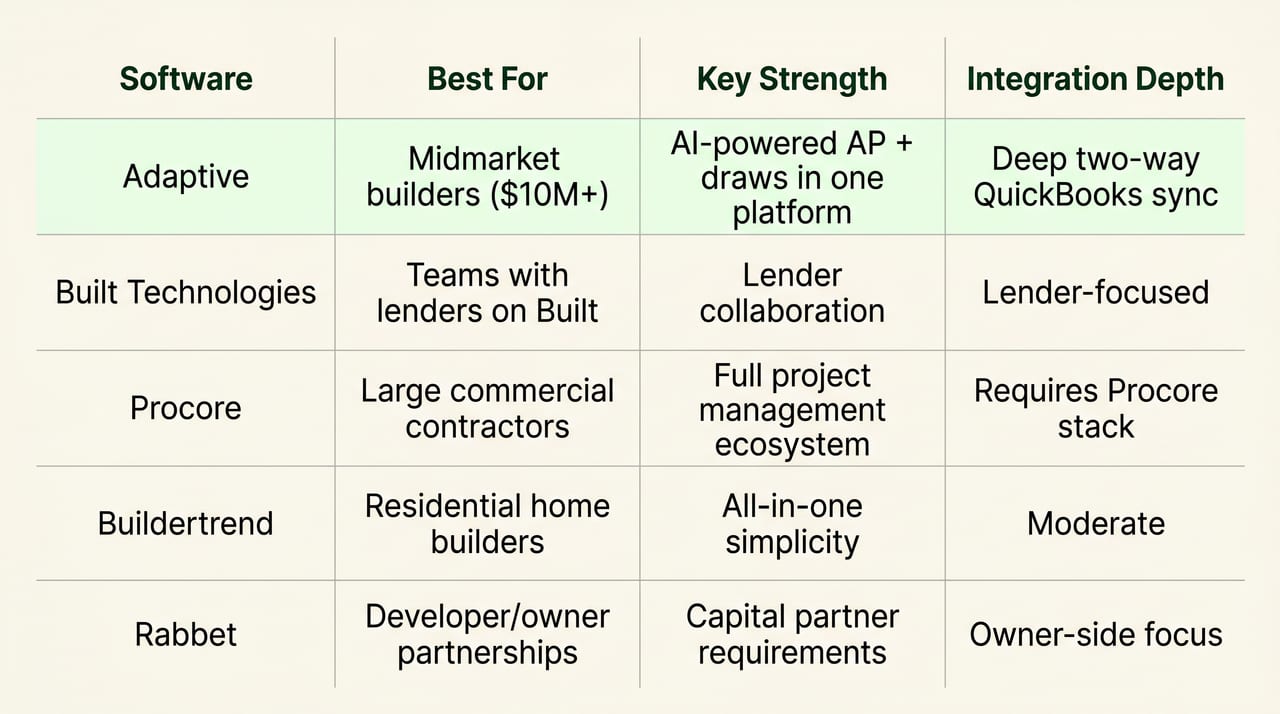
The options below are evaluated from the contractor and builder perspective—not the lender side. Each tool has a different sweet spot.
Adaptive
Adaptive brings AP automation, job costing, and draw management into one AI-powered platform. Bills get captured, coded to the right job and cost code, and routed for approval automatically. When it’s time to bill, you create fixed-fee or cost-plus draw packages in one click with all backup documentation attached.
The two-way QuickBooks sync keeps your books accurate without manual re-entry. For builders doing $10M+ in annual revenue who want draws, AP, and compliance in one place, Adaptive fits well.
Built Technologies
Built is primarily construction loan management software for banks and lenders. It has contractor-facing features, but the platform is designed around the lender’s workflow, not yours. If your bank already uses Built, you’ll collaborate there. Otherwise, it’s probably not your first choice.
Procore
Procore is a broader project management platform with financial tools bolted on. Draw features exist, but they work best if you’re already invested in the full Procore ecosystem. Large commercial contractors often land here because their entire operation runs on Procore.
Buildertrend
Buildertrend focuses on residential builders and remodelers who want project management and financials in one system. The draw capabilities are solid for home builders, though the financial controls aren’t as deep as specialized tools.
Rabbet
Rabbet leans toward the developer and owner side of construction lending. It includes contractor collaboration features, but the platform is built around capital partners’ needs. If your owner or lender requires Rabbet, you’ll use it. Otherwise, look elsewhere.
What to Look for in Construction Draw Software
Use these criteria when evaluating your options.
Deep Integration with Your Accounting System
Draws without accounting sync create double-entry and errors. Look for two-way QuickBooks sync—not just export capability. Data flows both directions, and your books stay accurate automatically.
Support for Your Contract Types
Ask whether the software handles your mix of fixed-fee, cost-plus, and T&M contracts. Demo with your actual contract types to see how each one works.
Automated Lien Waiver Collection
Manual lien waiver chasing is one of the biggest bottlenecks in draw processing. The software requests, tracks, and stores waivers automatically—or it doesn’t, and you’re still making phone calls.
Mobile Access for Field Teams
PMs approve costs and upload documentation from the jobsite. If field access is clunky or nonexistent, adoption suffers and you end up with gaps in your data.
Scalability for Growing Project Volume
Can the tool handle multiple concurrent projects and increasing transaction volume without adding headcount? Test this before you commit, especially if you’re planning to grow.
Why Spreadsheets Fail for Construction Draw Management
Excel-based draw tracking breaks down in predictable ways:
- No audit trail: You can’t prove who changed what or when
- Version control chaos: Multiple copies floating around with conflicting data
- Manual errors: Formulas break, data gets overwritten, numbers don’t tie out
- No compliance tracking: Lien waivers and insurance certificates get lost in email
- Delayed visibility: By the time you update the spreadsheet, the data is already stale
Spreadsheets work for simple projects with a handful of subs. They fail when you’re running multiple jobs with tight cash flow and lenders asking questions.
How to Automate Your Construction Disbursement Process
Moving from manual to a bulletproof draw process doesn’t require a massive implementation. Here’s the sequence most teams follow.
1. Connect Your Accounting System
Start with your ERP or QuickBooks integration. This establishes the source of truth for jobs, cost codes, and vendors. Everything else builds on this foundation.
2. Capture and Code Bills Automatically
AI reads invoices, matches them to jobs, and assigns cost codes without manual data entry. This step eliminates the biggest time sink in draw preparation.
3. Route Approvals and Collect Compliance Documents
Set up approval workflows so the right people sign off before bills become payable. Automated lien waiver requests go out to subs at the same time.
4. Generate Draw Packages in One Click
Approved, coded bills with compliance documents roll into a draw package ready for submission. What used to take hours now takes minutes.
5. Track Payments and Update Budgets in Real Time
Once the draw gets funded, payments post and budgets update automatically. The loop closes without manual reconciliation.
How Adaptive Streamlines Construction Draws and Payments
Adaptive combines AP, job costing, and draw management in one platform. Bills get captured and coded by AI. Lien waivers go out automatically. When it’s time to bill, you create draw packages in one click with all backup attached.
The two-way QuickBooks sync keeps your books accurate in real time. You see what’s happening as it happens—not weeks later when someone finally updates the spreadsheet.
FAQs about Construction Draw Software
What is the difference between construction draw software for lenders and contractors?
Lender-focused construction loan software manages disbursement risk from the bank’s side. Contractor-focused draw software helps you request and track payments owed to you.
How long does it typically take to implement construction draw software?
Most teams connect their accounting system and process their first draw within one to two weeks, depending on data complexity.
Can construction draw software handle both residential and commercial projects?
Yes, most platforms support both. However, some tools are optimized for one segment over the other—check that the tool fits your project mix.
What happens when a lender or owner rejects a draw request?
The software flags the rejection reason so you can correct missing documentation or errors and resubmit without starting over.
How does construction draw software handle change orders during active projects?
Change orders adjust the schedule of values and budget within the system. Subsequent draws reflect the updated contract amount automatically.
Ready for faster draws and real-time financial visibility?
Let us show you how Adaptive’s AI-powered construction financial management software works in a brief 30-minute demo with someone from our team.