AP Automation for Construction: Benefits, ROI, and How to Get Started
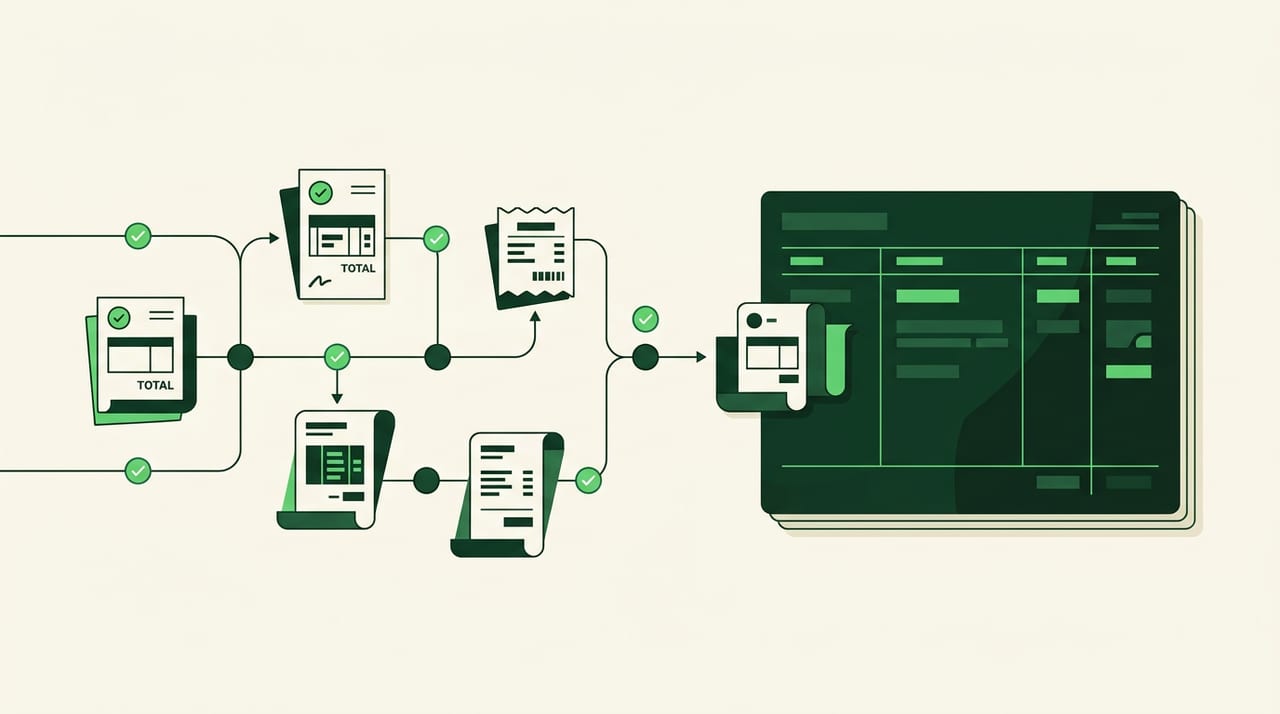
Construction AP is a volume game. You’re processing dozens—sometimes hundreds—of invoices per week from subs, suppliers, and vendors, and every single one ties to a specific job and cost code. When that process runs on paper, email chains, and manual data entry, invoices pile up, approvals stall, and your job cost reports are already outdated by the time you see them.
AP automation for construction is software that captures invoices, extracts the data, codes each bill to the right project, routes it for approval, and triggers payment—without anyone re-typing information. This guide covers how it works, the benefits that matter most for builders, and a clear path to implementation.
What Is AP Automation for Construction
AP automation for construction is software that handles invoice intake, coding, approvals, and payments without manual data entry. Instead of paper invoices piling up on someone’s desk, bills flow through a digital system that reads them, assigns them to the right job, routes them for approval, and pays vendors automatically.
AP automation = software that captures invoices, extracts data, routes approvals, and triggers payments without re-keying information.
Here’s the thing about construction: every invoice ties to a specific job and cost code. Your framing sub’s bill goes to one project, your electrician’s invoice to another, and each line item maps to a different cost category. Generic AP tools weren’t built for this. They don’t understand job costing, cost codes, or lien waivers. Construction AP automation does.
How Construction AP Automation Works
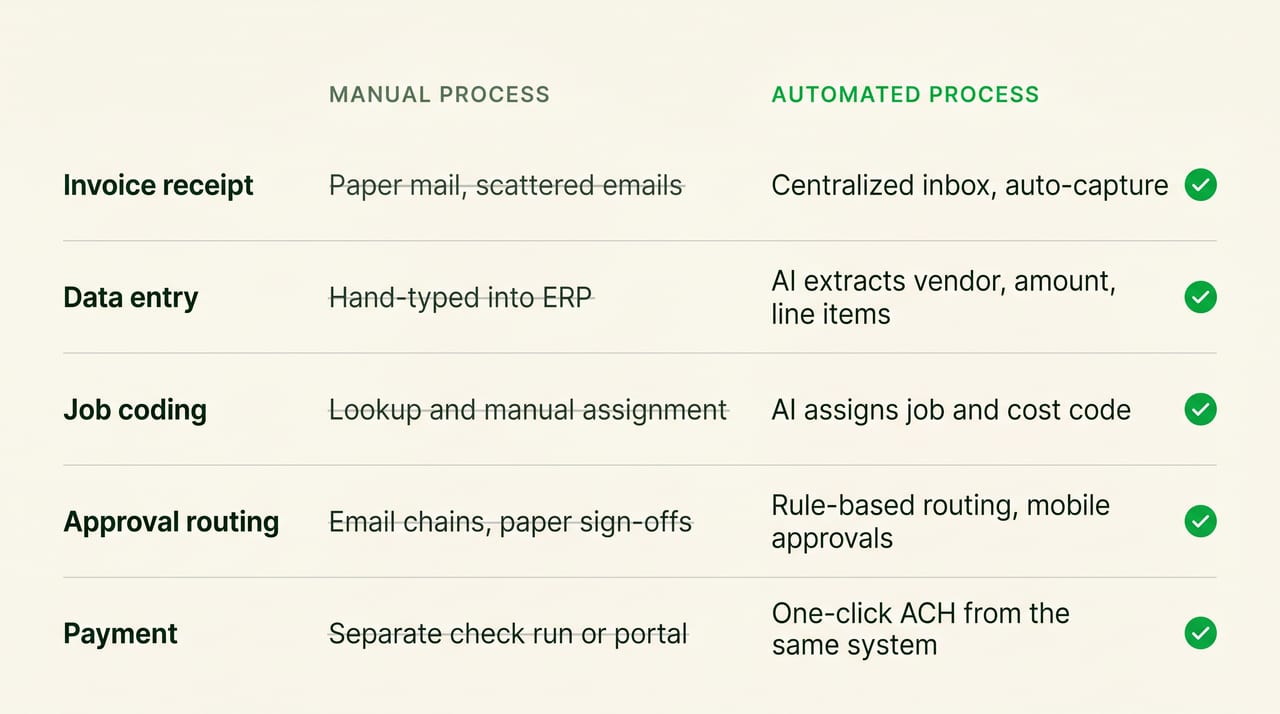
The workflow follows a predictable path. An invoice comes in, data gets extracted, the system codes it to the right job, approvers sign off, and payment goes out. Let’s walk through each stage.
Invoice Capture and Data Extraction
Invoices enter the system through email forwarding, direct upload, or a photo from your phone. The software uses OCR (optical character recognition) and AI to pull the vendor name, invoice number, amount, date, and line items automatically.
OCR = technology that reads text from images or PDFs and converts it to editable data.
You’re not re-typing anything. The system reads the document and populates the fields for you. Even messy handwritten invoices from suppliers often get captured accurately.
Job and Cost Code Coding
This is where construction AP automation separates from generic tools. The software assigns each invoice to the correct project and cost code based on vendor history, invoice details, and patterns it learns over time.
Cost code = a standardized category for tracking expenses within a job (e.g., 01-100 for rough framing, 01-200 for electrical rough).
The AI improves with use. The more invoices you process, the more accurate the coding becomes. After a few weeks, the system often codes bills correctly before you even look at them.
Approval Routing From Field to Accounting
Once coded, the invoice routes to the right approver based on rules you define. You might set it up so anything over $5,000 goes to the owner, while smaller bills go straight to the project manager.
PMs can approve from their phones while standing on the jobsite. No more chasing signatures or wondering where an invoice is stuck. You see exactly who has it and how long it’s been waiting.
Payment and Lien Waiver Issuance
After approval, the system triggers payment via ACH, check, or virtual card. For construction, this step includes something critical: automatic lien waiver requests.
Lien waiver = a document from a subcontractor or supplier confirming they’ve been paid and won’t file a lien against the property.
The system sends the waiver request when payment goes out and tracks the response. You don’t pay without protection, and you don’t chase paperwork manually.
Benefits of AP Automation Software for Construction
Construction companies lose money when their AP process can’t keep pace with project volume. According to Rabbet’s 2024 Construction Payments Report, payment delays have driven up costs by an estimated $280 billion across U.S. construction. Invoices pile up, approvals stall, and by the time you see the numbers, they’re already outdated.
Faster Construction Invoice Processing
Invoices that used to take days now process in minutes. There’s no waiting for someone to open mail, no re-keying from paper to screen, no hunting for the right cost code in a spreadsheet.
What used to take a week often happens same-day. Manual processing is benchmarked at 10 to 30 minutes per invoice—automated systems do it in seconds. Your accounting team stops being a bottleneck and starts keeping pace with the field.
Accurate Job Costing and Real-Time Visibility
Every invoice coded correctly means your job cost reports actually reflect reality. You see what you’ve spent on each project as it happens, not two weeks later when the damage is done.
You can’t control what you can’t see. When your numbers are current, you catch budget overruns before they become profit killers.
Stronger Compliance and Audit Readiness
Every action gets logged with a timestamp and user ID. Invoices, approvals, and lien waivers live in one searchable system.
When an auditor asks for documentation, you pull it in seconds instead of digging through file cabinets. The audit trail exists automatically.
Better Subcontractor and Vendor Relationships
Paying subs on time keeps them on your jobs. When a vendor calls asking about payment status, you answer immediately instead of promising to “look into it.”
Faster, more reliable payments often lead to better pricing and priority scheduling. A 2025 study from Built found that contractors inflate bids by an average of 8% to protect themselves against slow payments. Subs remember who pays on time.
Lower Cost per Invoice Without Adding Headcount
Automation lets your current team handle more volume. You’re not hiring another AP clerk to keep up with growth. You’re letting software do the repetitive work.
Hidden costs that disappear with automation:
- Late payment fees: incurred when invoices sit in approval queues
- Duplicate payments: caused by lack of visibility into what’s already been paid
- Paper and postage: eliminated with digital invoices and ACH payments
- Overtime: reduced when month-end close doesn’t require a scramble
ROI of Construction AP Automation
ROI shows up in several categories, often within the first few months of implementation.
- Labor efficiency: hours returned to your team each week that were previously spent on data entry and chasing approvals
- Error reduction: fewer duplicate payments, missed invoices, and miscoded expenses
- Cash flow visibility: you know exactly what’s owed and when, so you can time payments strategically
- Margin protection: you catch cost overruns before they erode profit
The math is straightforward. If your team spends 10+ hours per week on manual AP tasks and you eliminate most of that, the software pays for itself quickly. Most construction companies see positive ROI within the first quarter.
Must-Have Features in Accounts Payable Software for Construction
Generic AP tools lack construction-specific functionality. Here’s what to look for when evaluating construction accounts payable software.
AI Bill Coding to Jobs and Cost Codes
The system has to understand your chart of accounts structure: job, phase, cost code. Look for AI that learns your coding patterns and improves over time.
This feature separates construction AP automation from tools built for other industries. Without it, you’re still doing manual coding.
Two-Way ERP and Procore Sync
Data flows both directions. The AP system pulls job info from your ERP and pushes coded invoices back. If you use Procore, the integration pulls project data automatically.
One-way sync creates duplicate entry. Two-way sync keeps everything aligned without extra work.
Lien Waiver and Insurance Tracking
Construction payment can’t happen without compliance documents. The system automatically requests lien waivers, tracks insurance expirations, and blocks payments when docs are missing or expired.
This isn’t optional. It’s how you protect yourself from liens and liability.
Free ACH and Check Payments
Payment belongs inside the AP workflow, not as a separate step in another system. Look for free ACH. Some platforms charge per-transaction fees that add up fast when you’re paying dozens of subs each week.
Mobile Approvals From the Field
Project managers and superintendents aren’t sitting at desks. The system has to allow approvals from phones on the jobsite with push notifications and a mobile-friendly interface.
If your PM has to wait until they’re back at the office, you’ve already lost time.
ERP Integrations for Construction Invoice Processing
The best accounts payable software for construction connects to your existing ERP without replacing it. Two-way sync means job lists, cost codes, and vendor records stay current in both systems.
Common ERPs that construction AP automation integrates with:
- QuickBooks Online and Desktop
- Sage 100 Contractor and Sage 300 CRE
- Viewpoint Vista
- Foundation Software
- Procore (for project data)
- Jonas Construction
If your ERP isn’t on the list, ask about custom integrations before committing.
How to Get Started With AP Automation for Construction
Implementation doesn’t require a massive IT project. Most construction companies go live within a few weeks.
Step 1: Audit Your Current Accounts Payable Workflow
Map your current process: how invoices arrive, who touches them, where they stall, and how payments go out. Identify the bottlenecks and error-prone steps.
This baseline helps you measure improvement later. You can’t prove ROI without knowing where you started.
Step 2: Choose Construction Accounts Payable Software
Evaluate based on the features above. Prioritize construction-specific functionality over generic AP tools. Request demos and ask about implementation timelines.
Don’t just watch the sales demo. Ask to see job coding, lien waiver tracking, and ERP sync in action.
Step 3: Connect Your ERP and Project Management Tools
Implementation starts with integration setup. Jobs, cost codes, vendors, and GL accounts sync between systems. Good platforms handle this with minimal IT involvement.
Most integrations take a few hours, not weeks.
Step 4: Migrate Vendors and Configure Approval Rules
Vendor master data moves into the new system. Define approval routing rules by amount, job, or vendor type. Set up payment preferences for each vendor.
This is where you build the logic that makes automation work for your specific business.
Step 5: Roll Out to Project Managers and Measure Results
Field adoption is critical. Train PMs on mobile approvals. Track key metrics after go-live: processing time, approval cycle time, and on-time payment percentage.
Adjust rules as you learn what works. The system gets smarter, and so does your process.
Construction AP Automation vs Generic AP Tools
Generic AP platforms handle invoices, but they weren’t built for construction workflows.
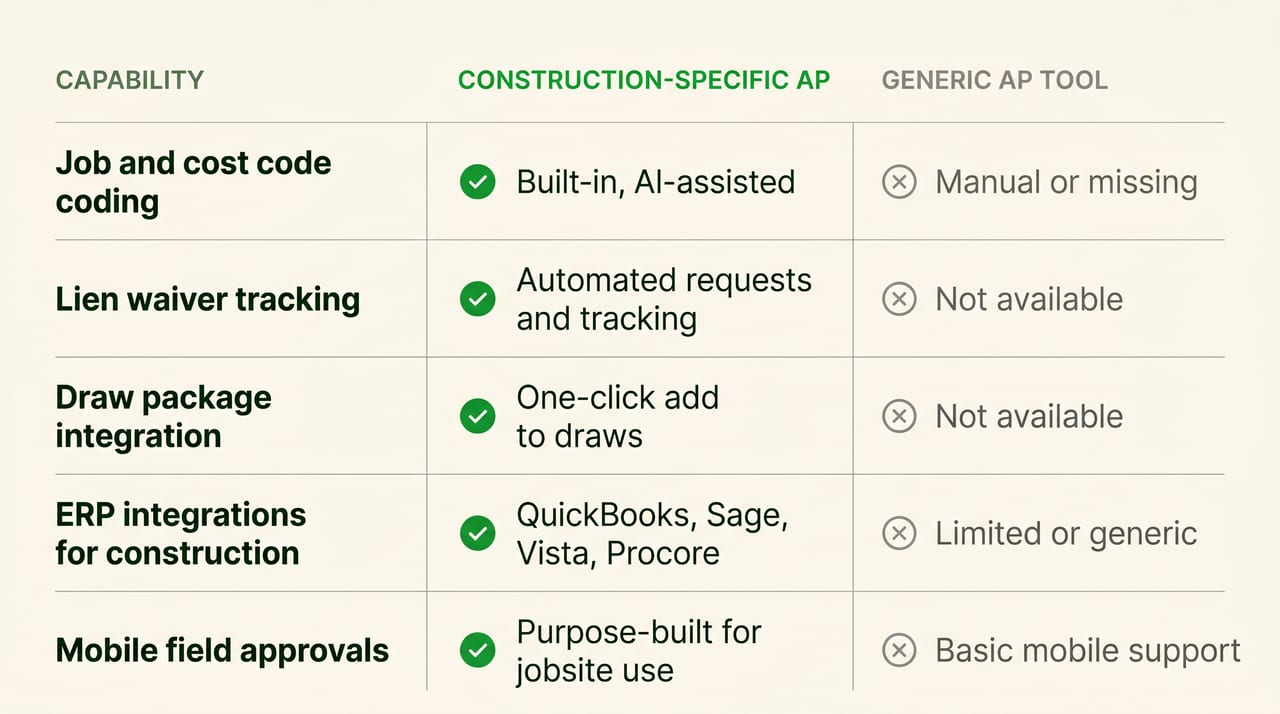
Construction companies often start with generic tools and outgrow them once project volume increases. The switch to construction-specific software usually happens after one too many miscoded invoices or missed lien waivers.
AP Solutions for Construction Businesses Built for Scale With Adaptive
Adaptive handles the full AP workflow in one platform: invoice capture, AI coding to jobs and cost codes, approval routing, ACH payment, and automatic lien waiver requests. The two-way sync with QuickBooks and Procore keeps your systems aligned without duplicate entry.
For construction companies evaluating AP automation platforms, Adaptive is purpose-built for the way builders actually work.
Frequently Asked Questions About AP Automation for Construction
How much does AP automation software for construction typically cost?
Pricing varies based on invoice volume and features. Most platforms offer monthly subscription pricing. Request a quote based on your specific volume to compare options accurately.
Is accounts payable outsourcing for construction better than AP automation software?
Outsourcing hands off work but reduces your visibility and control. AP automation keeps your team in control while eliminating manual tasks. Most growing contractors prefer software over outsourcing because they retain real-time access to their data.
How long does AP automation implementation take for construction companies?
Most construction companies go live within two to four weeks. Implementation time depends on ERP complexity and vendor volume. Simpler setups with QuickBooks often take less time than enterprise ERP integrations.
Can construction AP automation handle retainage and pay applications?
Yes. Construction-specific platforms track retainage, support pay application creation, and manage draw packages. Generic AP tools typically lack these features entirely.
How do construction payment automation platforms protect ACH transactions?
Reputable platforms use bank-level encryption, multi-factor authentication, and fraud monitoring. Verify that your vendor follows SOC 2 compliance standards before connecting bank accounts.