Construction Payments Software: The Essential Guide for Contractors
When you’re evaluating construction payment software, you’re really asking: what will actually eliminate manual work while protecting my cash flow? Let’s walk through what matters.
AI-powered bill capture and job costing
Modern platforms use AI to read invoices, pull out vendor details and amounts, and assign costs to the correct job and cost code automatically. Instead of your bookkeeper manually entering every bill, the system handles it in seconds. The accuracy improves over time as the AI learns your vendors and coding patterns.
Pay application processing and tracking
Pay apps (applications for payment) are how subs request payment for completed work. Software standardizes these using AIA G702/G703 formats, tracks submission status, and shows you exactly where each pay app sits in the approval process. No more wondering if something got lost in someone’s inbox.
Lien waiver collection and exchange
Lien waivers are legal documents that protect you from double payment claims. When a sub signs a waiver, they’re confirming they’ve been paid and won’t file a lien against the property. Payment software automates sending waiver requests, collecting signatures, and tying completed waivers to payment release.
Vendor compliance and document management
Every sub needs current insurance certificates, W-9s, and sometimes safety certifications before you can pay them. The system tracks expiration dates and notifies you when documents need renewal—so payments don’t stall because someone’s COI lapsed three weeks ago.
Electronic ACH payments to subcontractors
ACH (Automated Clearing House) transfers move money electronically between bank accounts. They’re faster than checks, cheaper than wire transfers, and create automatic payment records. Many platforms offer free ACH, which adds up when you’re cutting dozens of payments monthly.
Automated approval workflows
Bills and pay apps route through customizable approval chains—field to PM to controller to payment. Everyone sees what’s waiting for them, and you get a complete audit trail of who approved what and when.
Real-time dashboards and reporting
You see payment status, cash flow projections, and project financials at a glance rather than waiting for month-end reports.
How construction pay apps work in payment software
The pay application process is where most payment delays start. Here’s how software handles each step.
Submitting and receiving pay applications
Subs submit pay apps through a portal or by forwarding documents to the system. The software captures the data, validates it against the contract, and queues it for review. From the GC side, you see all incoming pay apps in one place instead of scattered across email threads and desk piles.
Matching pay apps to budgets and cost codes
The system compares requested amounts against contracted values and budget line items. If a sub requests more than their remaining contract balance, you’ll know immediately—before it becomes a job costing mistake downstream.
Routing pay apps through approval workflows
Once submitted, pay apps move through your approval chain automatically. Field supervisors verify work completion, PMs confirm scope, and accounting validates amounts. The system tracks each approval with timestamps, which matters when audit time comes around.
How to automate lien waivers and compliance tracking
Manual lien waiver management is tedious—chasing signatures, matching waivers to payments, filing everything correctly. Automation changes the game here.
Sending lien waiver requests automatically
When you initiate a payment, the system sends the appropriate waiver request to the sub. Conditional waivers go out with payment notification; unconditional waivers are requested after funds clear. No spreadsheet tracking required.
Tracking insurance certificates and renewals
The platform stores all compliance documents and monitors expiration dates. When a sub’s COI is expiring in 30 days, you get notified. When it expires, payments can be automatically held until updated documentation arrives.
Enforcing compliance before releasing payment
You can configure the system to block payments when required documents are missing or expired. This protects you from paying subs who aren’t properly insured—a risk that could cost you far more than the payment itself.
How to streamline construction accounts payable
Your AP process probably involves too much paper chasing and manual entry, with manual processing costing $15–$17 per invoice. Here’s how payment software addresses that.
Capturing bills from subs and vendors
Bills come in through multiple channels: email forwarding, mobile upload, or direct portal submission. The system centralizes everything so nothing gets lost in someone’s inbox or buried on a desk.
Coding bills to jobs and cost codes with AI
AI reads each bill and assigns it to the correct job and cost code based on vendor history, invoice details, and your coding patterns. Your team reviews and approves rather than entering data manually—a significant time savings when you’re processing dozens of bills weekly.
Eliminating email chains with automated approvals
Instead of forwarding bills through email and hoping everyone responds, approvals happen in-platform. Comments, questions, and approvals are all tracked in one place with complete visibility into where things stand.
Electronic payments and ACH processing for contractors
Moving money efficiently is the final step—and often the most manual part of traditional processes.
Paying vendors and subs via free ACH
ACH payments typically clear in 1-3 business days and cost a fraction of wire transfers. Many construction payment platforms offer free ACH, eliminating per-transaction fees that add up quickly when you’re paying 20+ subs monthly.
Tracking disbursements and payment status
You see real-time status for every payment: pending, sent, cleared. Subs can check their payment status without calling your office, which reduces the “where’s my check?” calls that eat up admin time.
Connecting payments to lien waiver release
The system can hold payment release until signed waivers are received, or automatically send payments once waivers clear. This conditional logic protects you while keeping money moving.
Integrations with accounting and construction management tools
Payment software should work alongside your existing systems—it doesn’t replace them.
Two-way sync with your accounting tools
Two-way sync means data flows in both directions. Bills entered in the payment platform appear in your existing system; payments recorded in your existing system update the payment platform. No double entry, no reconciliation headaches at month-end.
Connecting to project management tools
Project management integrations pull budget data, job information, and cost codes from your PM system. Changes sync automatically, keeping everything aligned without manual updates.
Eliminating double entry across systems
The ROI of integration is straightforward: less manual entry means fewer errors and significant time savings. Your team works in one system while data flows to others automatically.
Real-time reporting and cash flow visibility
Stale financial data leads to bad decisions. Real-time visibility changes how you operate day to day.
Tracking budgets vs actuals by job
You see estimated versus actual costs per project as transactions happen—not after month-end close. This lets you catch overruns while there’s still time to adjust course.
Monitoring work in progress in real time
WIP (work in progress) tracking shows earned revenue versus billed revenue across all jobs. This helps with draw timing, cash flow forecasting, and identifying jobs that are overbilled or underbilled before they become problems.
Spotting cash leakage before it hurts margins
Cash leakage = money that slips out through duplicate payments, missed billables, unprocessed change orders, or coding errors. Real-time visibility helps you catch these issues before they compound into real margin damage.
Who needs subcontractor payment software
Different contractor types benefit in different ways from payment software.
Commercial builders and general contractors
GCs managing multiple subs across multiple projects see the biggest impact. With GCs spending over 60 hours monthly on payment management, high bill volume, complex pay app workflows, and extensive compliance requirements make automation essential at scale.
Specialty contractors and trade partners
Subs benefit from faster payments, easier pay app submission, and clear visibility into payment status. Research shows subs wait an average of 56 days for payment, so the same platform that helps GCs pay faster helps subs get paid faster.
Custom home builders and remodelers
Residential builders manage draws, owner communication, and fewer but larger vendor relationships. Payment software streamlines draw creation and keeps owners informed throughout the project.
Construction accounting firms
Outsourced accounting partners use payment software to serve multiple construction clients efficiently with standardized, automated workflows across their client base.
How to choose the right contractor payment platform
Not all platforms deliver the same value. Here’s what to evaluate when comparing options.
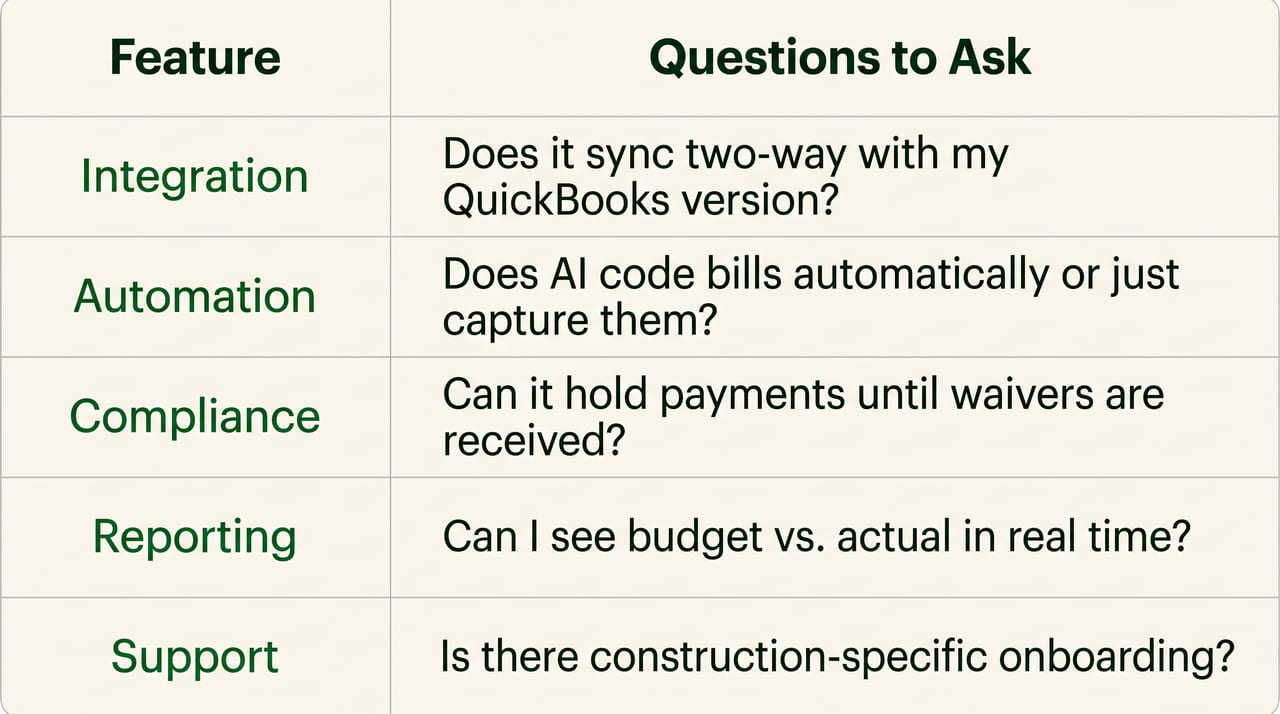
1. Evaluate accounting system and ERP integration depth
Check for true two-way sync versus one-way export. Ask which versions are supported—Online, Desktop, and Enterprise have different integration capabilities.
2. Assess AI and automation for AP and pay apps
Look for AI that actually reads and codes bills automatically, not just digital forms that still require manual entry.
3. Confirm lien waiver and compliance features
Verify the platform handles automated waiver exchange, compliance tracking, and payment holds for missing documents.
4. Look for real-time job costing and budget tracking
Ensure you can see budget versus actual in real time, not just after month-end close.
5. Consider onboarding speed and customer support
Ask about implementation timeline and support availability. Construction-specific support matters—generic software support often doesn’t understand job costing or pay apps.
How Adaptive delivers construction payment management
Adaptive is the AI-native financial operating system built specifically for construction. The platform handles the full workflow—from bill capture through payment and lien waiver—while maintaining a real time sync with your ERP.
- AI-powered AP: Bills are read, coded to jobs, routed for approval, and paid via free ACH
- Lien waiver automation: Waivers sent and tracked automatically with payments
- Real-time budgets: See budget vs. actual as transactions happen, not after month-end
- Deep integrations: Two-way integrations keeps all of your systems aligned
- Built for construction: Purpose-built workflows for draws, job costing, and compliance
FAQs about construction payments software
How is construction payment software different from generic accounts payable tools?
Construction payment software includes job costing, pay application workflows, lien waiver management, and compliance tracking that generic AP tools lack. It’s built around project-based billing rather than simple invoice processing.
What return on investment can contractors expect from payment management software?
Contractors typically see improved margins through reduced cash leakage, time savings from automation, and lower accounting costs by handling more volume without adding headcount.
How long does construction payment software take to implement?
Most cloud-based platforms can be set up within days to a few weeks, depending on integration complexity and data migration requirements.
Can construction payment software handle both GC and subcontractor workflows?
Yes, most platforms support both sides—GCs manage incoming pay apps and outgoing payments, while subs can submit pay apps and track payment status through the same system.
Do subcontractors need their own accounts to receive payments through contractor payment platforms?
Typically, subs receive an invitation to access a portal for submitting pay apps and documents, but they can often receive ACH payments without creating a full account.