The 5 Financial Workflows Every Construction Team Should Automate
Construction finance teams spend more time chasing paper than managing money. Bills pile up in inboxes and approvals stall in email threads. By the time your WIP report is ready, the numbers are already three weeks old.
Automating financial workflows changes that equation. Software handles bill coding, approval routing, compliance tracking, and reporting. Your team focuses on the exceptions that actually require judgment.
This guide breaks down the five workflows that deliver the fastest return when automated. It also covers how to get started without replacing your existing systems. Learn more about automating financial workflows in construction to reduce errors across your back office.
What Financial Workflow Automation Means in Construction
Automating construction finance turns the notoriously tedious month-long close into a real-time, continuous cycle. Eliminating manual data entry reduces discrepancies and prevents budget overruns. Your team gets numbers they can act on while the information is still relevant.
So what exactly is financial workflow automation? It’s software handling repetitive financial tasks without manual input. Think of it as the difference between manual entry versus automated systems.
You type invoices into QuickBooks yourself, or a system reads, codes, and routes them automatically.
Here’s the distinction that matters, though. Most tools layer automation on top of manual processes—you’re still doing the same work, just with a few shortcuts.
True automation embeds intelligence at the core. The system handles the work; you handle the exceptions.—organizations that take this approach are 2.8x more likely to see real value from AI.
The system handles the work; you handle the exceptions.
What does this actually look like day to day?
- Bills auto-coded to jobs: System reads invoices, matches them to jobs and cost codes, queues for approval.
- Approvals routed without emails: The right PM gets notified automatically based on rules you’ve set—not because someone remembered to forward a PDF.
- WIP updates continuously: As costs hit and billing goes out, your work-in-progress report reflects current reality, not last month’s snapshot.
The Hidden Cost of Manual Financial Workflows
When your financial workflows run on spreadsheets, email chains, and manual entry, the problems compound quietly. You don’t notice the cash leaking out until margins are already thin.
The core issue is simple: you can’t control what you can’t see. Manual processes create lag, and lag creates blind spots. See how automating financial processes in construction addresses these gaps.
Here’s what that looks like in practice:
- Delayed job costing: Bills sit in inboxes for days. Decisions get made on stale numbers.
- Approval bottlenecks: One PM on vacation means invoices pile up. Vendors get frustrated, early-payment discounts disappear, and relationships strain.
- Compliance gaps: Lien waivers and insurance certificates tracked in folders or spreadsheets get missed. Payments stall—or worse, you pay without proper documentation.
- Cash leakage: Duplicate payments, missed billables, unprocessed change orders. These add up fast when no one has real-time visibility.
Builders scaling without knowing their real gross margin often find themselves busy but barely profitable.
The 5 Financial Workflows Every Construction Team Should Automate
1. Accounts Payable and Job Cost Coding
AP is the highest-volume workflow in construction finance, and it’s where most errors start. Every miscoded invoice ripples through your job costing, WIP, and profitability reports.
Manual bill entry means someone reads each invoice, decides which job it belongs to, picks a cost code, and types it into the system. Multiply that by dozens or hundreds of bills per week, and types it into the system. At that pace, one FTE can process only about 6,000 invoices annually.
Multiply that by the error potential on each entry, and you’ve got a recipe for mistakes and delays.
Automated AP works differently. AI reads every bill and extracts the relevant data. It matches the bill to the right job and cost code based on patterns it’s learned, then routes it for approval.
Once approved, payment goes out via ACH. No checks to print, no stamps to buy.
If you automate nothing else, start here. Explore key processes to automate in your construction business for a broader view.
2. Budget Tracking and Real-Time Job Costing
Static budgets in spreadsheets go stale the moment you save them. By the time you compare actuals to budget at month-end, the damage is already done.
Real-time job costing means your budgets update as costs hit. When a bill gets approved and coded, the budget reflects it immediately. You see where you stand today—not where you stood three weeks ago.
This visibility is what prevents budget slippage and margin erosion. You catch overruns while there’s still time to adjust, not after the job is closed out.
3. Progress Billing and Draw Packages
Assembling draw packages manually is tedious work. You’re pulling backup documentation, matching invoices to line items, chasing signatures, formatting everything for the bank or owner.
Automated billing lets you create fixed-fee or cost-plus draws in seconds. Bills already coded to the job attach with one click. The package generates in the format your lender or owner expects.
Faster billing means faster cash. InFaster billing means faster cash. Subcontractors wait an average of 56 days for payment—in construction, cash flow timing often matters more than profit margin.
4. Lien Waivers and Subcontractor Compliance
Compliance items like lien waivers, insurance certificates, and W-9s are easy to track when you have five subs. At scale, they become a nightmare.
Manual tracking means someone maintains a spreadsheet, remembers to check expiration dates, and chases documents before every payment. Miss one, and you either delay payment (frustrating your sub) or pay without proper documentation (exposing yourself to risk).
Automated compliance management tracks every document, notifies you before renewals expire, and holds payments until requirements are met. No more audit surprises.
5. WIP Reporting and Cash Flow Forecasting
Work-in-progress reports are the heartbeat of construction financial management. They tell you whether jobs are overbilled or underbilled, and they drive your cash flow forecasting.
The problem with manual WIP is that it’s outdated the moment you build it. You’re pulling data from multiple sources, making assumptions about percent complete, and hoping nothing changed since you started.
Automated WIP updates continuously as job costs and billing hit the system. Your forecasts reflect current reality, and your monthly close stops being a fire drill. Read more about AI-powered construction financial reports and dashboards.
How to Automate Financial Workflows in Construction
Step 1. Audit your most time-consuming manual processes
Before you automate anything, figure out where your team spends the most time on repetitive tasks. Is it bill entry? Chasing approvals? Assembling draw packages? Building reports?
Start with the biggest bottleneck. That’s where automation delivers the fastest return.
Step 2. Standardize cost codes and approval rules
Automation requires consistency. If every project manager uses different cost codes, or if approval routing changes based on who remembers what, no system can help you.
Review your chart of accounts. Set clear rules for who approves what, at what thresholds, and in what order. Don’t guess—set rules.
Step 3. Choose a platform that integrates with your ERP
You don’t have to replace your construction accounting software to automate workflows. Look for platforms that offer two-way sync with your existing ERP—whether you’re using QuickBooks for construction, Sage, or something else.
The goal is a single source of truth, not another disconnected tool.
Step 4. Roll out one workflow at a time
Phased implementation reduces disruption. Start with AP, get your team comfortable, then expand to billing, compliance, and reporting. See who delivers construction finance workflow automation to evaluate your options.
Train the team on each workflow before adding the next. Rushing the rollout creates resistance and mistakes.
How Construction Finance Automation Connects With Your ERP
One of the biggest concerns we hear: “I don’t want to replace my accounting system.” You don’t have to.
Modern automation platforms layer on top of your ERP with two-way sync. Data flows both directions—bills entered in the automation platform appear in your ledger, and changes in your ERP reflect back.
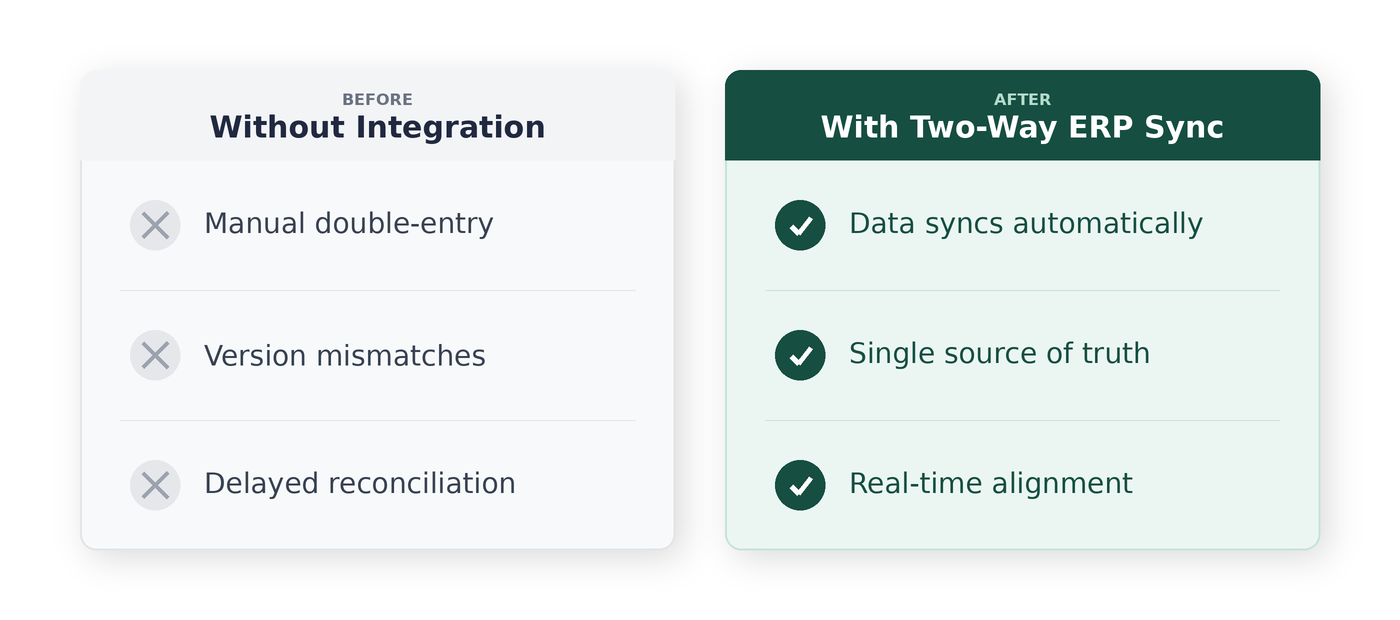
Common integrations include QuickBooks Online, QuickBooks Desktop, Sage, and project management tools like Procore. The right platform keeps systems aligned without forcing you to start over.
The ROI of Automating Construction Financial Workflows
Automation ROI shows up in three places:
- Margin protection: Better visibility into job costs prevents cash from leaking through miscoded expenses, missed billables, and duplicate payments.
- Time savings: Eliminating manual data entry and approval chasing frees up hours every week—hours your team can spend on higher-value work.
- Team capacity: Finance teams handle more projects without growing headcount. You scale the business without scaling the back office proportionally.
When you automate financial workflows in construction, the return is measurable from day one, not something you hope to see in a year.
Run Construction Finance on an AI-Powered Operating System
Adaptive is built differently. Instead of bolting automation onto manual processes, AI sits at the core of every workflow—AP, job costing, billing, payments, compliance, and WIP.
The platform ingests data from across your systems, organizes it intelligently, and moves work forward in real time. Approvals advance, budgets update, compliance gets tracked, and reporting stays current without manual coordination.
And because the AI continuously learns your patterns, it gets better the more you use it.
Frequently Asked Questions About Automating Construction Financial Workflows
Can I automate financial workflows without replacing my accounting software?
Yes. Modern platforms integrate with your existing ERP through two-way sync. You keep QuickBooks, Sage, or whatever you’re running—the automation layer sits on top and keeps everything aligned.
How long does it take to implement construction finance automation?
Implementation time varies by platform and scope. Phased rollouts that start with one workflow like AP can show results within weeks rather than months. You don’t have to automate everything at once.
How accurate is AI at coding construction invoices?
AI-powered platforms learn your coding patterns over time. Accuracy improves with use, and most platforms handle the majority of bills without manual intervention. You review exceptions, not every invoice.
What is the difference between project management software and financial workflow automation?
Project management tools track schedules, field activity, and documentation. Financial workflow automation handles back-office processes—AP, billing, compliance, job costing—between the field and accounting. They’re complementary, not competing.